Within MBAs according to the IAEA requirements KMPs should be created. NUCMAT allows creating 2 types of KMPs:
·Inventory KMP for tracking physical location and amount of nuclear materials (one should note that LOF itself represents an inventory KMP),
·Flow KMP for tracking inventory changes,
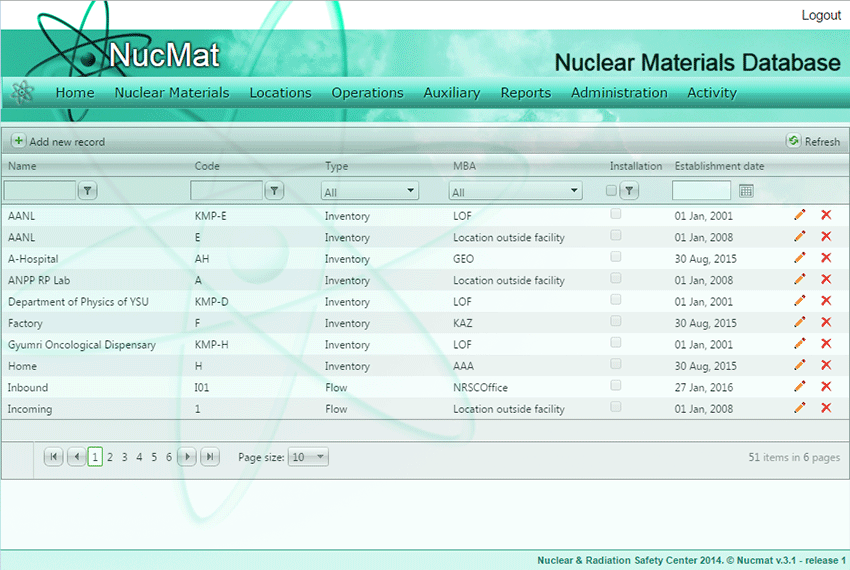
To create a new KMP or to update parameters of the existing KMP the user should use the KMPs command from the Locations submenu (see Fig. 5.1). As result, a new window opens which shows the list of existing KMPs in NUCMAT (if any) and the Add new record command button (see Fig. 5.3a).
Fig. 5.3a. Locations/KMPs window
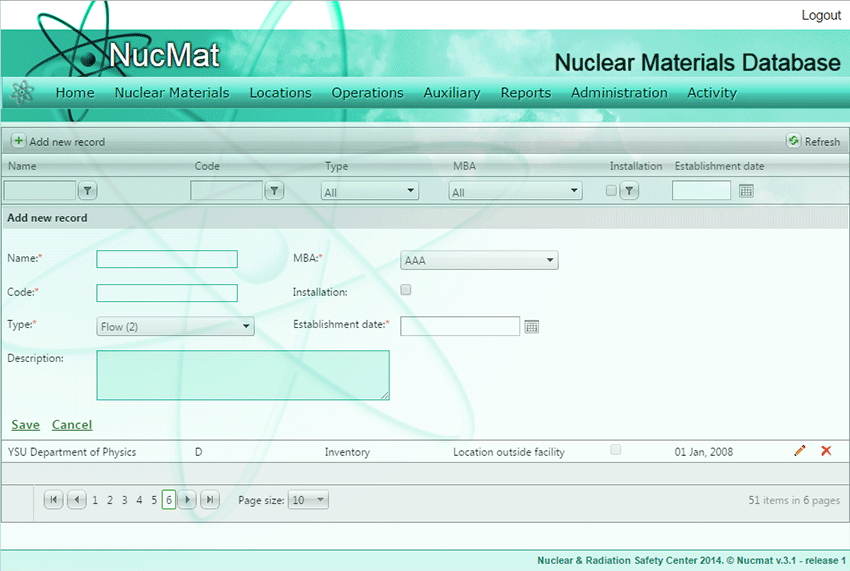
To create a new KMP the user should click on the Add new record command button. As a result, a new window opens and requires the user to input following information (Fig. 5.4):
·KMP name. This is just for the user to easily remember KMP, for example, Physics Institute, Cooling Pool etc.
·MBA name to which KMP belongs
·KMP code. This official code assigned by the IAEA to KMP and indicated in Facility Attachment or other document agreed with the IAEA.
·Type. As mentioned above type could be Inventory or Flow.
·Description. Free format text for the user to describe KMP.
Fig. 5.4. Creation of KMP
If created Inventory KMP is a LOF type, then installation checkbox should be checked.
If the user wants to update parameters of created/existing KMP or remove KMP from NUCMAT then he/she should use the Edit () and Delete () buttons respectively.

 ) and Delete (
 ) buttons respectively.